

Locate Your Water Meter Box
Your water meter box is typically located near the front of your property, close to the street, enclosed in a black box with a blue lid labeled "water." In order to open the lid, it is recommended to use a tool such as a large screwdriver by inserting it into one of the holes and gently prying off the lid.
Inside the box, you may encounter wasps, bees, ants, and arachnids. Avoid using your hands to open the lid.
Warning: If you have one of our new smart water meters, a transmitter will be affixed to the lid with a wire connecting it to the meter. It is extremely important not to damage these wires. In the event of damage to Port O’Connor Improvement District's equipment, including but not limited to the meter box, lid, meter, transmitter, or connecting wire, the District will repair or replace all affected equipment at the customer's expense. POCID is not liable for any personal injuries or damage to the customer's equipment and facilities
Inside the Water Meter Box
When you open the meter box cover, you will see a light gray Diehl Hydrus smart water meter.
On the front of the protective cover, you will see:
- An 8-digit meter number located at the top right
- The meter type and size located at the bottom left
Compare the meter number to what your bill states on the top left of your bill
Using the Meter’s Digital Display
To toggle manually between screens, locate the optic eye sensor directly below the screen and use your finger to cover & uncover the sensor. To remain on the current screen, continuously hold your finger over the sensor.
Errors & Alerts
If there are any active errors or alerts, this a screen will display: E---_A-3-
Current Total Volume
This screen shows total water use in gallons since the meter was installed.
Read the display from left to right using standard place values: ones, tens, hundreds, thousands, etc
The previous months reading is subtracted from the current reading to calculate total water use for your bill each month. Customers are billed per 1,000 gallons of water used. While the meter displays every gallon that has passed through it, the customer’s bill reflects the total number of full 1,000-gallon units used.
Flow Rate
Displays the current flow rate in gallons per minute (gpm). If water is not currently in use, the gpm will display all zeros. It is normal for this number to change depending on your water usage at any given time.
Current Water Temperature
Displays the temperature of the water inside the service line
*Click on the document at the bottom of the page for descriptions
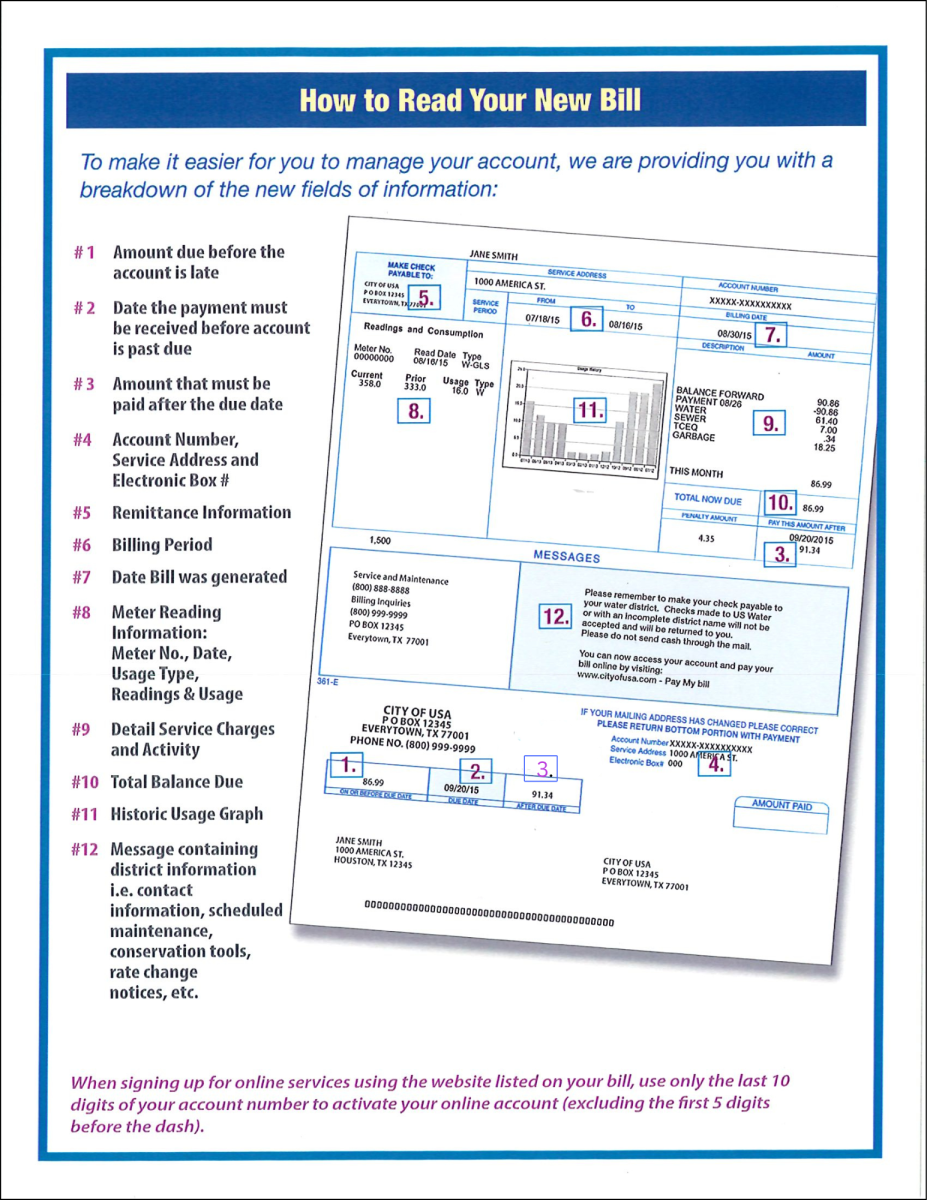 How to Read my Bill